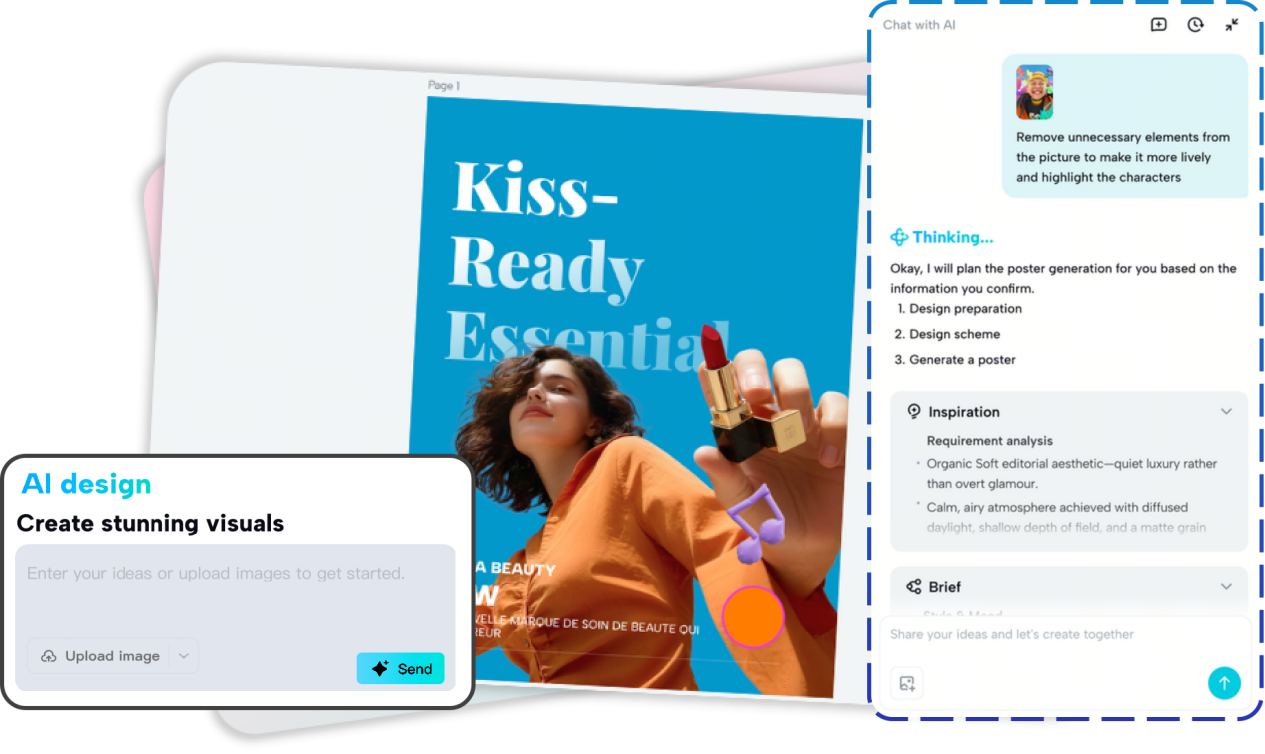
CapCut AI design platform
BEIJING, Feb. 12, 2026 (GLOBE NEWSWIRE) -- In early 2026, the latest AI image generation model, Seedream 5.0, sparked widespread attention and discussion. AI design tools are accelerating the transformation of visual content creation. Against this backdrop, CapCut, a cross-platform application that covers everything from basic video/image editing to AI image & video generation, has become a tool that content creators can no longer afford to overlook.
Why Choose CapCut AI Design
CapCut AI design stands out as a versatile and user-friendly tool, offering creators and professionals an efficient way to generate high-quality visuals.
- Platform: Web, Windows, Mac, Android, iOS
- Plan: Free tier with up to 10 uses per day; Premium at $19.99/m
- Key features: AI image generation, poster design, smart editing, batch processing, rich templates, Conversational AI
Pros:
- Cross-platform support
- Simple natural-language input — no complex prompts required
- Strong models like Seedream 4.5 and Nano Banana Pro under the hood
- Daily free usages and extensive templates
Cons:
- Not as deep as traditional professional design suites
- Free daily credits limit heavy users
Experience this tool on CapCut AI Design
CapCut AI design supports text-to-image generation and style transformation. It offers 10 daily free uses, allowing me to enjoy the tool fully. Its intuitive interface impressed me deeply. Using conversational AI, I can easily create unique visual materials. Additionally, it's extensive templates that cover social media, marketing, and education streamlines my creative workflows significantly.
Here, I will share the top 10 practical use cases for CapCut AI design. Whether you are a product marketer or an art designer, you will discover the scenarios where CapCut efficiently level up your creativity.
Top 10 Practical Use Cases for CapCut AI Design
1.Social Media Visuals Creation
CapCut AI Design enables me to quickly generate visuals suitable for platforms like TikTok, YouTube, and Instagram. Leveraging the latest AI models, it accurately interprets text prompts to create the images I need. Combined with social media-optimized templates, it significantly reduces my content creation time while maintaining professional-quality visuals.
2.Brand Logo & Identity Design
As an AI logo generator, CapCut AI design platform can help businesses and individuals create brand identities with highly consistent visual styles. By inputting the brand concept and sample image materials, it can quickly produce high-quality logos or distinctive visual elements for you, making it simple to maintain a professional and cohesive brand image.
3.Marketing & Promotional Poster Production
Whether for product launches or holiday campaigns, CapCut's AI Design generator allows you to create posters, flyers, banners, and any promotional material you need. It also supports one-click style transformation, multi-style integration, size adjustments, etc., offering an efficient solution for your marketing activities.
4.Video Cover & Thumbnail Image Design
As a YouTube video creator, I usually. CapCut's AI design tool to create eye-catching video covers and thumbnails after editing my videos using CapCut video editor. This method is far more effective than simply capturing a frame from the video, making my content more standout and attractive.
5.Educational Content & Infographics
For educational scenarios such as school courses and enterprise training, CapCut is also a powerful assistance tool - you can use CapCut to quickly create class materials, teaching images, infographics, and other content. CapCut's AI image generator can produce clear and vivid content, enhancing the attention and comprehension of learners.
6.E-Commerce Product Visuals
Product display images are one of CapCut AI design's strongest suits. I often provide CapCut with the original product images and let it create multi-angle, high-quality, and stylistically consistent product marketing images. Moreover, with its rich templates, my e-commerce store is ready for major events such as Black Friday or Christmas campaigns with minimal effort.
7.Personalized Digital Art & Custom Creations
Using functions such as text-to-image generation, style transfer, and batch generation, CapCut AI design lets you easily create personalized illustrations, digital cards, or social media portraits. Whether for personal collection or marketing purposes, CapCut transforms your creative ideas into finished designs quickly and effortlessly.
8.Rapid Prototyping & Creative Ideation
CapCut's AI design supports the multi-version generation and intelligent design layouts. For designers, using CapCut's conversational AI enables them to quickly test visual concepts and iterate creative ideas, allowing for quick comparison and optimization of creative designs, eliminating the need for manual repetitive operations.
9.Multi-Version Content Batching Output
Batch design generation is a core feature of CapCut AI design. It can automatically adjust the image sizes and content layout in batches, making it suitable for multi-platform distribution or producing different versions of marketing content. For example, you can generate multiple variations of a headphone campaign with different layouts, colors, and copy, ready for various online stores.
10.Consistent Brand Identity
While generating multiple pieces of content, CapCut ensures design consistency across all outputs. This enables enterprises to maintain a consistent visual style across different events or platforms, thereby establishing a distinctive and cohesive brand identity that resonates with audiences and fosters loyal followers.
Conclusion
CapCut's AI design tool is reshaping the creative methods and workflows of visual content. It lowers the barrier to professional design and offers modern creators a more efficient solution. From social media visuals to marketing posters, CapCut's AI design demonstrates extensive, practical potential, meeting the multi-scenario design needs of modern creators.
FAQs
1. How does CapCut AI design work?
CapCut AI Design uses a multi-agent system that analyzes your prompt, plans design tasks, assigns them to specialized agents, and delivers refined visual results through a conversational workflow.
2. What types of visual content can I create with CapCut AI Design?
You can create images, posters, brand logos, product visuals, illustrations, and portraits using AI image generation, image transformation, style transfer, and batch processing features.
3. Is CapCut AI Design suitable for non-designers and professionals alike?
Yes. Its conversational interface lowers the learning curve for beginners, while batch generation, smart resizing, and style consistency make it efficient for designers and marketing teams.
Company: Capcut
Contact Person: Ming Hu
Email: capcutweb@bytedance.com
Website: Capcut.com
City: Beijing
A photo accompanying this announcement is available at https://www.globenewswire.com/NewsRoom/AttachmentNg/118343cc-481f-4c00-9a0d-4831461d1b47

